
NewLine App for Android, iOS and Windows — Download and Get 200 Points
Applications across four platforms with the full casino, sportsbook, esports markets, NewLine Originals games and bonuses. Install on your phone or desktop, log in once, and your account, balance and bonuses sync across every device automatically.
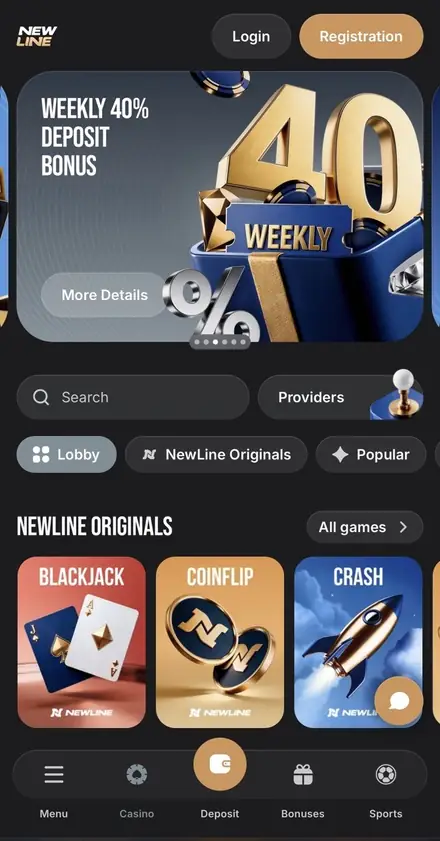
NewLine offers applications on four different platforms. Android players get a native APK downloaded directly from the site. iOS is supported via a PWA — a web app added to the home screen through Safari. macOS gets a PWA via Safari's Share menu (Add to Dock), opening in a focused window. Windows users get a PWA that installs through the browser and opens in its own focused window. This page breaks down what's actually available, how to install on each platform, what features carry over from the desktop, and what bonuses you earn just for downloading.
Install the App and Get 200 NewLine Points
A one-time bonus credited automatically to your loyalty balance. Combine with the 100 Points for enabling push notifications — that's 300 Points before you place a single bet, and 1,200 Points exchange for 1,000 INR.
Install Mobile AppWhich Platforms Does NewLine Support?
The footer of every NewLine page contains a download block labelled "200 Points for installing the app", marked "Available for Android and iOS" with a single Install button covering both mobile platforms. Windows users are prompted with an "Install NewLine app" popup on first visit to the site. macOS users can add NewLine to the Dock via Safari's Share menu.
| Platform | Status | Distribution | Installation Bonus |
|---|---|---|---|
| Android | Native APK available | Direct download from NewLine website | 200 NewLine Points (one-time) |
| iOS (iPhone, iPad) | PWA (Add to Home Screen via Safari) | Official NewLine website via Safari | 200 NewLine Points (one-time) |
| macOS | PWA (Add to Dock via Safari Share menu) | Official NewLine website via Safari | Not awarded for macOS install |
| Windows | PWA via browser | Install prompt on first site visit | Not awarded for Windows install |
| Web (any device with browser) | Always available | Official NewLine website | — |
Important detail: NewLine does not publicly confirm distribution through Google Play or the App Store. The Android APK comes directly from the NewLine website. This is standard for online casinos — major app stores typically restrict gambling apps in many regions, including India. The advantage is that you always get the latest build straight from the operator; the trade-off is that you need to confirm you're on the official URL before installing.
What's Inside the NewLine App
The mobile, macOS and Windows applications carry the full feature set of the desktop platform. There are no reduced game libraries, no missing markets and no separate balance — everything is one shared account.
| Feature | Available in App |
|---|---|
| Casino lobby with all categories (Slots, Live Casino, Roulette, Game Shows, Baccarat, Blackjack, Crash, Quick games, Drops & Wins) | Yes |
| 11 NewLine Originals exclusive games (Blackjack, Coinflip, Crash, Dice, Double, Hilo, Keno, Mines, Penalty, Plinko, Poker) | Yes |
| 85+ game providers (BGaming, Hacksaw, PG Soft, 3 Oaks Gaming and more) | Yes |
| Sportsbook (prematch and live) with cricket, football, tennis and 9+ esports disciplines | Yes |
| Esports betting (CS2, Dota 2, LoL, Valorant, CoD, Mobile Legends and more) | Yes |
| Wheel of Fortune mini-game inside the betslip | Yes |
| All bonuses (welcome pack, cashback, weekly 40%, weekend FS, express boost) | Yes |
| NewLine Points loyalty balance and exchange to INR | Yes |
| Cashier (deposits, withdrawals, transaction history) | Yes |
| 24/7 live chat support | Yes |
| Push notifications for promotions and bonuses | Yes — earns extra 100 Points |
| Two-factor authentication / biometric login | Not currently offered on any NewLine version |
One important security note: NewLine does not currently offer two-factor authentication, biometric login (Face ID, Touch ID) or fingerprint unlock on any version of the platform — desktop, mobile, macOS or Windows. Account safety relies on your password and confirmed email. Use a strong, unique password and don't share login details with anyone.
How to Install the NewLine App on Android
Open NewLine in your mobile browser
Use Chrome, Samsung Internet or any other modern browser on your Android phone. Make sure you're on the official NewLine website before doing anything else.
Scroll to the footer
Find the orange "200 Points for installing the app" card. The text reads "Available for Android and iOS". Tap the white Install button.
Allow installation from your browser
Android may prompt you to allow installations from "unknown sources" or from your specific browser. Approve the request — it's required because NewLine distributes the app outside Google Play. The setting is per-browser and you can disable it again afterwards.
Complete the installation
Follow the prompts to install the app. The NewLine icon appears on your home screen. Tap to launch.
Log in or register
Use your existing email and password. If you don't have an account yet, register inside the app — the same form as on desktop. INR is supported as your account currency.
Claim your 200 Points and enable notifications
The 200 NewLine Points are credited to your loyalty balance automatically. When the notification permission popup appears, accept it for an extra 100 Points one-time bonus.
How to Install the NewLine App on iOS
Open NewLine in Safari
Safari is the required browser for adding a PWA on iPhone and iPad. Make sure you're on the official NewLine website.
Scroll to the footer download card
Find the "200 Points for installing the app" card with "Available for Android and iOS" text. Tap the Install button, or use the steps below directly from Safari.
Tap the Share icon
Tap the Share icon (square with an arrow) at the bottom of the Safari screen.
Select "Add to Home Screen"
Scroll through the share sheet and tap "Add to Home Screen". Confirm by tapping "Add" in the top-right corner.
Open the NewLine app from your home screen
The NewLine icon appears on your home screen. Tap it to launch — the app opens at full screen without the Safari address bar.
Log in and claim 200 Points
Sign in with your existing account or register inside the app. The 200 NewLine Points install bonus is credited automatically. Accept the notification permission popup for an extra 100 Points.
How to Install the NewLine App on macOS
Open NewLine in Safari on your Mac
Visit the official NewLine URL in Safari. This is the supported browser for the macOS PWA install.
Click the Share icon in the address bar
In Safari on macOS, the Share button is in the address bar.
Select "Add to Dock"
Choose this option from the Share menu.
Click "Add" and log in
NewLine appears in your Dock and opens in a focused window without browser tabs. Sign in with your usual credentials — balance, bonuses and Points are already there waiting.
How to Install the NewLine App on Windows
Open the NewLine website on your Windows PC
Use Chrome or Edge for the best PWA experience. Confirm you're on the official NewLine website before proceeding.
Look for the install prompt
On first visit, NewLine displays an "Install NewLine app" popup in the browser window. Click to install.
Alternatively, install from the browser address bar
In Chrome or Edge, look for the install icon (monitor with a down arrow) in the address bar and click it to install the PWA.
Launch and log in
The NewLine app appears in your Start menu and taskbar. Sign in with your existing account or create a new one — INR is supported as your account currency.
Why Install the App vs Using the Browser
Reasons to Install
The app version offers several practical advantages over the browser, especially for regular players.
- One-time +200 NewLine Points awarded for installation
- Push notifications for promotions, bonuses and account events (+100 Points for enabling)
- One-tap launch from home screen — no need to find the URL each time
- Native full-screen experience without browser address bar or tabs
- Works even when the desktop site is temporarily unavailable in your region
- Same account, balance and bonuses as desktop — perfectly synced
What to Keep in Mind
A few practical points before you install.
- Apps are downloaded directly from NewLine, not Google Play or App Store
- You'll need to confirm you're on the official URL before installing
- iOS, macOS and Windows apps are PWA installs rather than native applications
- Two-factor authentication and biometric login are not available on any version
- VPN, proxy or TOR usage is forbidden by Terms — applies to apps too
- KYC verification at first withdrawal works the same on app and desktop
App Bonuses — 200 + 100 Points and More
APP INSTALLATION BONUS
+200 NewLine Points
- Awarded one-time per account for installing the mobile app
- Applies to both Android and iOS apps
- Credited automatically to your NewLine Points loyalty balance
- Combine with bets and other Points sources to reach the 1,200 minimum exchange
- For INR players: 1,200 Points convert to 1,000 INR after a 750 INR betting volume per Point
- Wagering after exchange: x1 only
PUSH NOTIFICATIONS BONUS
+100 NewLine Points
- One-time bonus for enabling push notifications on first visit
- The popup appears automatically when you open the app or site
- Confirm subscription and Points are credited immediately
- Bonus also unlocks access to exclusive offers including no-deposit bonuses and special deposit promotions
These two Points bonuses are independent of the welcome bonus and don't compete for your single active casino bonus slot. They land directly in your loyalty balance, not your bonus balance, so you can stack them with the welcome pack, weekly 40% deposit bonus, weekend free spins and any other promotion at the same time.
Mobile-Friendly Bonuses to Claim After Installation
Once the app is installed and you're logged in, the full NewLine bonus catalogue becomes available exactly as it does on desktop. Here's what you can activate from the mobile interface:
| Bonus | Reward | Mobile-Specific Notes |
|---|---|---|
| Welcome Bonus (Fiat) | 300% + 350 FS across 4 deposits | Min deposit 11.5 USD or INR equivalent — same as desktop |
| Welcome Bonus (Crypto) | 360% + 350 FS | Crypto wallets work natively in the app cashier |
| Weekly 40% Deposit Bonus | Up to 550 USD | Activate Mon–Fri inside the Bonuses tab |
| Weekend 30 FS Bonus | 30 FS in Royal Fruits Multilines | Activate Sat–Sun once per week |
| Weekly Cashback | Up to 30% of net losses | Awarded automatically Friday → Saturday |
| Express Bet Boost | +7% to +15% on accumulators | Available in the sportsbook section |
| Email Verification | 20 FB in Chicken Road | Verify from profile settings inside the app |
| NewLine Points Exchange | 1,200 Points → 1,000 INR | Open Balance → NewLine Points → Exchange |
Frequently Asked Questions about the NewLine App
Yes. NewLine offers a native APK for Android and a PWA for iOS, both listed in the website footer under a single Install button. For iOS, the installation adds a shortcut to your home screen via Safari — it launches like a regular app but is delivered as a web app rather than an App Store download.
Open the NewLine website in a mobile browser, scroll to the footer and click the Install button on the "200 Points for installing the app" card. Follow the on-screen instructions to allow installation from your browser, then complete the setup. The app is downloaded directly from NewLine — not from Google Play.
NewLine does not distribute through the App Store. The iOS version is a PWA — open the official NewLine website in Safari on your iPhone or iPad, tap the Share icon, select "Add to Home Screen" and confirm. The icon appears on your home screen and the app launches in full screen.
Yes. NewLine awards 200 NewLine Points one-time when you install the mobile app. The Points are credited to your loyalty balance automatically and can be exchanged for real money once you reach the 1,200 Points minimum threshold (1,000 INR per 1,200 Points for Indian players). The bonus applies to both the Android and iOS apps.
Yes — both. Windows users can install NewLine as a PWA through any Chromium-based browser, with an "Install NewLine app" prompt on first visit. macOS users can add NewLine to the Dock via Safari's Share menu (Share → Add to Dock). Both open in a focused window with no browser tabs. Note that the 200 Points install bonus is tied to the Android and iOS apps, so macOS and Windows installs do not earn the bonus.
The mobile app carries the full feature set of the desktop platform — thousands of slots from 85+ providers, live casino tables, 11 NewLine Originals exclusive games (Crash, Plinko, Mines and more), full sportsbook with cricket and football, esports betting across 9+ disciplines, all bonuses, NewLine Points loyalty and the cashier. Push notifications are supported, with an additional 100 Points awarded for enabling them.
No. The NewLine app shares the same account, balance, bonuses and bet history as the desktop website. Log in with your existing email and password — everything syncs in real time. If you don't have an account yet, you can register directly inside the app.
Yes. INR is one of 60+ currencies supported by NewLine, and the same currency settings apply across the desktop site, mobile app, macOS and Windows. All deposits, withdrawals, bonuses and the NewLine Points exchange table work in INR. Specific Indian payment methods are shown inside the cashier after registration.
NewLine distributes the Android app directly from its official website rather than through Google Play. Always download from the official NewLine domain before tapping Install. The app uses the same encryption and AML/KYC compliance as the desktop platform, with mandatory KYC verification at first withdrawal.
Download the NewLine App Today
The mobile app gives you the full NewLine experience compressed into a tap on your home screen — every slot, every live dealer table, every cricket and football market, every NewLine Originals game and every bonus. Combine the install bonus with the 100 Points for notifications and you're 300 Points into your loyalty balance before placing a single bet. Ready to start? Download from the footer of the official site, log in with your existing account or register, and pick up where you left off on any device.
NewLine apps are distributed directly from the official website. Always confirm you are on the official NewLine domain before installing. The platform is for players aged 18 and over. Gambling carries financial risk — set deposit limits, take regular breaks and use the self-exclusion feature inside your account if play stops being entertainment. Recognised support resources include GamCare, Gambling Therapy and Gamblers Anonymous.Install Now and Get 200 Points
Native APK for Android plus PWAs for iOS, macOS and Windows. Same account everywhere, full feature set and an instant 200 NewLine Points loyalty bonus on Android/iOS installation.
Download NewLine App